
Paranoia as a Service: Securing My Dev Setup
Published on 7/10/2026 • 5 min read
The AUR Scare
So the recent AUR malware campaign happened. And yeah, it was AUR packages, but under the hood, it was still heavily reliant on malicious npm packages and scripts doing the actual dirty work.
I know the standard Arch-vet response is: “Just read the PKGBUILD.” And they are right, yes, reading the PKGBUILD would prevent you from installing something that pulls down arbitrary bash scripts or sketchy binaries. It doesn’t hurt to have that as your first line of defense. But I want a setup that assumes I will eventually fuck up, or that a trusted package I use every day will get compromised upstream.
So, here is how I’ve been structuring my development environment to mitigate supply-chain attacks and stop infostealers in their tracks.
1. Scoping Dev Tools with Mise
The absolute worst thing you can do is have npm, bun, or pip installed system-wide and running with elevated privileges. If malware piggybacks off a global npm install, it has a much wider blast radius. (You could use Nix for this, which is great for declarative environments, but I currently use mise).
With mise, you can prevent these runtimes from being installed system-wide. Instead, you scope them strictly to the project directories that actually need them.
For example, you can configure mise to only expose Node and Bun when you cd into your web dev folder:
~/Projects/js/mise.toml or ~/Projects/js/webapp-1/mise.toml. Outside of those directories, the system doesn’t even know what npm is.
2. Secrets Management with Pass(age)
If you’re still leaving .env files full of plaintext API keys and database credentials lying around your file system, you are making an infostealer’s job too easy. A simple find . -name ".env" -exec cat {} + and they have everything.
I use pass (though you can also use passage, which is a fork that uses age encryption instead of GPG as the backend).
Coupled with mise, you can inject your secrets as environment variables at runtime. They never touch the disk in plaintext.
In your mise.toml, it looks like this:
[env]
ADMIN_PASSWORD="{{ exec(command='pass show adminpass') }}"
STRIPE_KEY="{{ exec(command='pass show stripe-dev') }}"
When you enter the directory, mise runs pass, decrypts the secret in memory, and maps it to the environment variable.
3. Situational Awareness (The PGP Popup)
This setup creates a very useful side effect: Situational Awareness.
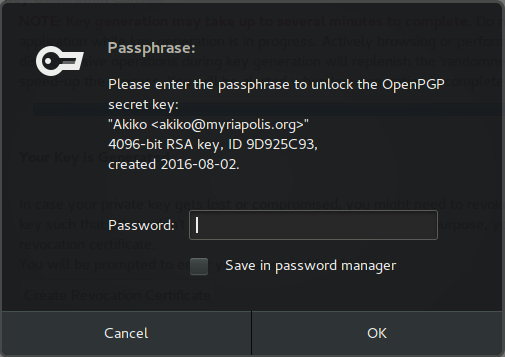
Because your secrets are encrypted, accessing them requires your GPG/age passphrase (or a hardware key touch). If I cd into my project directory, the GPG pinentry popup appears asking for my password. That makes sense; I requested the secret.
But, if I’m just mindlessly scrolling on xitter or watching YouTube, and suddenly a passphrase popup appears out of nowhere to unlock my PGP secret key, that is a massive red flag.
It means a background process, potentially malware, is attempting to decrypt your password store or export your PGP keys to send off to a C2 (Command and Control) server. Be mindful of when it makes sense to take action. If that prompt pops up unexpectedly, hit cancel, disconnect from the internet, and start hunting for the rogue process.
4. The Last Line of Defense: UFW & OpenSnitch
Assuming the worst has happened, the malware bypassed the PKGBUILD review, executed via a scoped npm script, and somehow grabbed your data, it still needs to exfiltrate that data to the attacker. Network-level monitoring is your last line of defense.
Inbound Restrictions (UFW)
Normally, malware connects out to a C2 server to drop off stolen data. But threat actors are getting weird. In an interview with Pryx (a former admin of the Hellcat Ransomware group), they mentioned using a “Server-Side Stealer”. Instead of making loud outbound connections, the malware hosts a Tor onion service right on your infected device. The attacker then simply makes a GET request to your machine to remotely scrape the data, heavily reducing detection risks.
To stop this, just enable ufw (Uncomplicated Firewall) and set the default incoming policy to deny. Only explicitly allow the local ports you actually need to access on your LAN.
Outbound Restrictions (OpenSnitch)
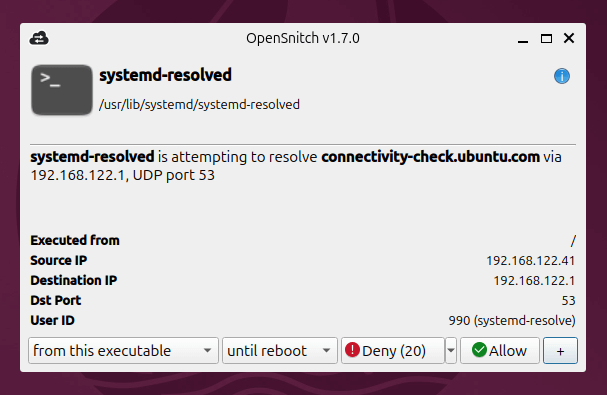
To stop traditional outbound exfiltration, use OpenSnitch. It’s an application-level firewall that intercepts any program trying to make a network request and gives you a popup to allow or deny it.
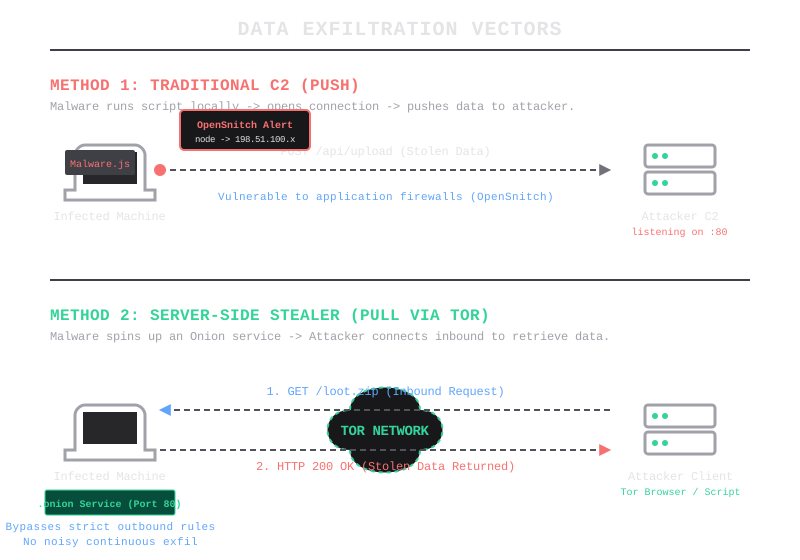
If I run a script and suddenly /usr/bin/node is trying to make a TCP connection to some random IP address, OpenSnitch catches it.
Side note: I personally never click “Allow Forever” on these prompts. Not even for systemd-resolved, not for Mullvad, nothing. The most I will grant is “Until Reboot”. I realize that level of pop-up fatigue is definitely not what I’d recommend for most normal people, but it keeps me hyper-aware of exactly what my machine is talking to.
Conclusion
Is this the end-all-be-all of Linux desktop security? No. There are always ways for sophisticated threat actors to circumvent these tools (and honestly, you could throw ClamAV in the mix too, though I’ve personally never used it).
But security is about layers. Reading the PKGBUILD stops the lazy attackers. Scoping with mise limits the blast radius. pass keeps secrets encrypted at rest. And opensnitch/ufw act as the tripwires if everything else fails.
Just secure your shit.